Project Overview
Built for smart campuses, this system removes passwords
from the login flow entirely. A student opens the web
portal, a time-limited QR code appears, and they scan it
with the companion Android app. A fingerprint prompt
confirms it's really them, the backend approves the
session over a live socket connection, and the browser
is redirected straight into their dashboard — no typing,
no password to leak.
Type
Full-Stack + Android
Auth Method
QR + Biometric
Key Features
🔲
Time-Limited QR Login
Each session generates a unique QR code that expires in 60 seconds, killing replay attacks.
👆
Biometric Verification
Android's BiometricPrompt confirms fingerprint identity before any session is approved.
⚡
Real-Time Approval
Socket.io pushes login approval to the browser instantly — no polling, no delay.
🔐
Zero Stored Passwords
No password is ever entered, transmitted or stored — approval happens entirely on-device.
📶
Device Binding
Roll number, device ID and IP are bound at registration so only the trusted device can approve.
🎓
Campus-Ready
Designed for labs, libraries and web portals that need fast, secure, contactless sign-in.
How It Works
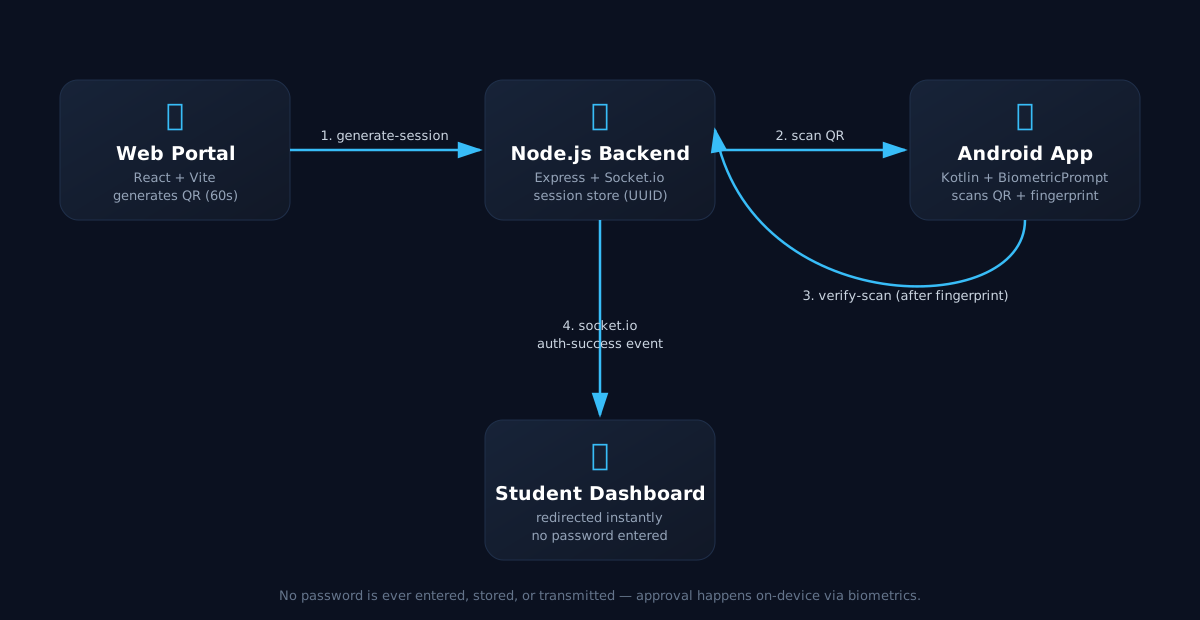
The flow bridges three components — a React web portal, a
Node.js/Socket.io backend, and a native Android app — into a
single passwordless handshake.
1️⃣
Generate Session
Web portal calls the backend, which creates a UUID session and returns a QR payload.
2️⃣
Scan & Verify
The Android app scans the QR and triggers a native fingerprint prompt before sending anything.
3️⃣
Approve Session
After biometric success, the app posts the roll number and device ID to /api/verify-scan.
4️⃣
Instant Redirect
The backend emits an auth-success event over Socket.io and the browser redirects to the dashboard.
Tech Stack
⚛️
React + Vite
Web portal — QR generation, live session status and countdown timer.
🟢
Node.js + Express
REST API for session creation and scan verification.
🔌
Socket.io
Real-time, bidirectional push of login approval to the browser.
🤖
Kotlin (Android)
Native app for QR scanning and device registration.
👆
AndroidX Biometric
BiometricPrompt API for on-device fingerprint verification.
📷
CodeScanner + OkHttp
Camera-based QR decoding and HTTP calls back to the backend.
Source Code
Explore the backend, React frontend and Android app
source, documentation and implementation details
on GitHub.
Open GitHub